How to know when Claude Code is done
You start a long task, switch to something else, and come back nine minutes later to find it finished eight minutes ago — or worse, that it stopped to ask you a question and has been sitting there since. There is a built-in notification for this. It is off in most terminals, and it only fires when Claude Code believes you are away.
The part that is already built in
Claude Code fires a notification when it finishes a task or pauses for a permission prompt — but with a condition that explains most of the "it never notifies me" reports: it only fires when you appear to be away from the terminal. If you are sitting in the window watching it work, there is nothing to interrupt you about, so nothing happens. Testing it by staring at the terminal is therefore a test that is designed to fail.
The second condition is the terminal itself. A desktop notification is sent by default in Ghostty, Kitty and iTerm2, and nowhere else. In any other terminal — Warp, the VS Code integrated terminal, Apple Terminal, Alacritty — nothing arrives until you ask for the bell instead:
// ~/.claude/settings.json
{
  "preferredNotifChannel": "terminal_bell"
}
Three further things swallow the notification even once it is enabled, and each looks like the feature being broken:
| If | Then |
|---|---|
| You use iTerm2 | Forwarding is not on by default. Settings → Profiles → Terminal, enable Notification Center alerts, then under Filter Alerts allow escape-sequence-generated ones. |
| You run inside tmux | tmux swallows it. set -g allow-passthrough on in ~/.tmux.conf, then tmux source-file ~/.tmux.conf. |
| Nothing appears anywhere | Check that the terminal application itself has notification permission in your OS settings — the notification is delivered by the terminal, not by Claude Code. |
If you would rather have a sound you choose, a Notification hook runs alongside the built-in one rather than replacing it:
{
  "hooks": {
    "Notification": [
      { "hooks": [{ "type": "command",
                    "command": "afplay /System/Library/Sounds/Glass.aiff" }] }
    ]
  }
}
That is the whole of the built-in answer, and for a single session it is usually enough. The rest of this page is about why it stops being enough, and it starts with a definition problem.
"Done" is three states, not one
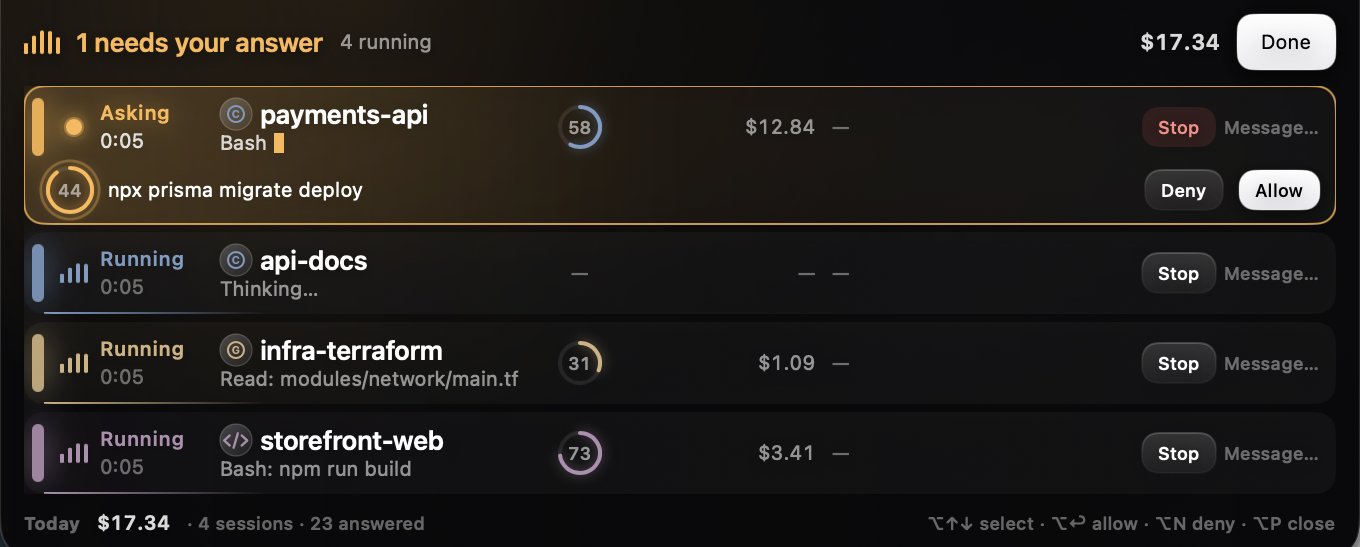
If you build anything on top of this — a notifier, a status line, a dashboard — the first thing you discover is that the question "is it done?" has no single answer. There are three states, they mean different things to you, and only one of them is urgent:
| State | What it means | Does it need you? |
|---|---|---|
| Running | Working. Tools are being called. | No |
| Waiting | Stopped mid-task on a permission prompt, a question, or a plan to approve. | Yes, and it is blocked until you answer |
| Idle | The turn ended. It said its piece and is waiting for your next instruction. | Only when you want it to |
The events map onto those states cleanly enough once you know which is which:
UserPromptSubmitandPostToolUse→ running. Each one is also proof of life, which matters later.Notification→ waiting. The message says whether it is a permission request or a question.Stop→ idle. Not "the work is finished" — it means this turn ended, which is a much smaller claim.SubagentStop→ nothing, as far as the parent is concerned. A subagent finishing says nothing about whether the session that spawned it needs you.
The trap: a status nobody is going to correct
Here is the failure we shipped, and it is the one worth stealing the fix for. On 21 August a session sat showing waiting for your input for over an hour. The user had answered in the terminal within seconds. Nothing was wrong with the answer — the problem was that the hooks had been connected after that session started, so the event that would have cleared the waiting state was never sent. The state was correct when it was written and quietly became a lie afterwards.
This is not a niche case. Any of these produce the same shape:
- The session started before your hooks were installed
- The process was killed, so no
Stopand noSessionEndever arrives - The machine slept mid-task
- Your hook script broke for ten minutes and you fixed it
An event-driven state machine only knows what it was told. It cannot distinguish "still waiting" from "was waiting, and the update went missing", because both look like silence. So it needs one rule that does not depend on receiving anything:
// After this long with no event at all, a non-idle status
// is no longer evidence of anything.
static let staleAfter: TimeInterval = 10 * 60

func isStale(now: Date) -> Bool {
    status != .idle && now.timeIntervalSince(lastEventAt) >= staleAfter
}
Ten minutes of total silence and we stop asserting the state. Note the status != .idle half: idle is the one state that should persist, because a session that ended its turn an hour ago is still, correctly, a session that ended its turn. Only the active claims expire. The principle generalises past this codebase: a status you cannot stand behind must not be presented as current, and stale evidence should decay on its own rather than wait for a correction that may never come.
Two hooks, opposite designs
One last thing worth copying if you write your own. Status events and permission prompts want opposite designs, and using one design for both is how people end up with a notifier that makes their agent feel slow.
| Status events | Permission prompt | |
|---|---|---|
| Job | Report what happened | Answer a question, or decline to |
| Design | Fire and forget | Blocking |
| Our timeout | curl -m 0.3 | curl -m 52, inside a configured "timeout": 55 |
| On failure | Give up silently, exit 0 | Print {} — no opinion — and exit 0 (exit 2 would block) |
A status hook must never make the CLI wait: nothing depends on its answer, so a third of a second is generous and anything longer is a tax on every single tool call. A permission hook is the opposite — something is waiting on its answer — but it still has to return inside whatever timeout it was given, which is why we set that to 55 in the config and give the curl inside it 52. The default for a command hook is 600 seconds, which is much longer than you want a blocking hook to hold a tool call, so set it deliberately. Both exit 0 on an ordinary failure — and deliberately so, because exit 2 would block the call. There is more on that, including the five ways a hook silently does nothing, in why your Claude Code hook isn't running.